AIPickr
Short answer: The ElevenLabs Free plan ($0, 10,000 credits a month) is enough to draft short voiceovers and download them as MP3 files. In our test, a 718-character script used 718 credits, and the only download format was MP3 128kbps. Free has no commercial license, per ElevenLabs’ official pricing page (Last checked: 2026-11), so move to Starter before you publish for money. That upgrade advice is based on the official feature list; no paid plan was part of our hands-on test.
We ran one script once on 2026-11-13 with default settings, then checked the credit balance, the download and the settings panel. Voice quality was not evaluated. Tested on the Free plan; paid plans may perform differently.
What we tested on the Free plan
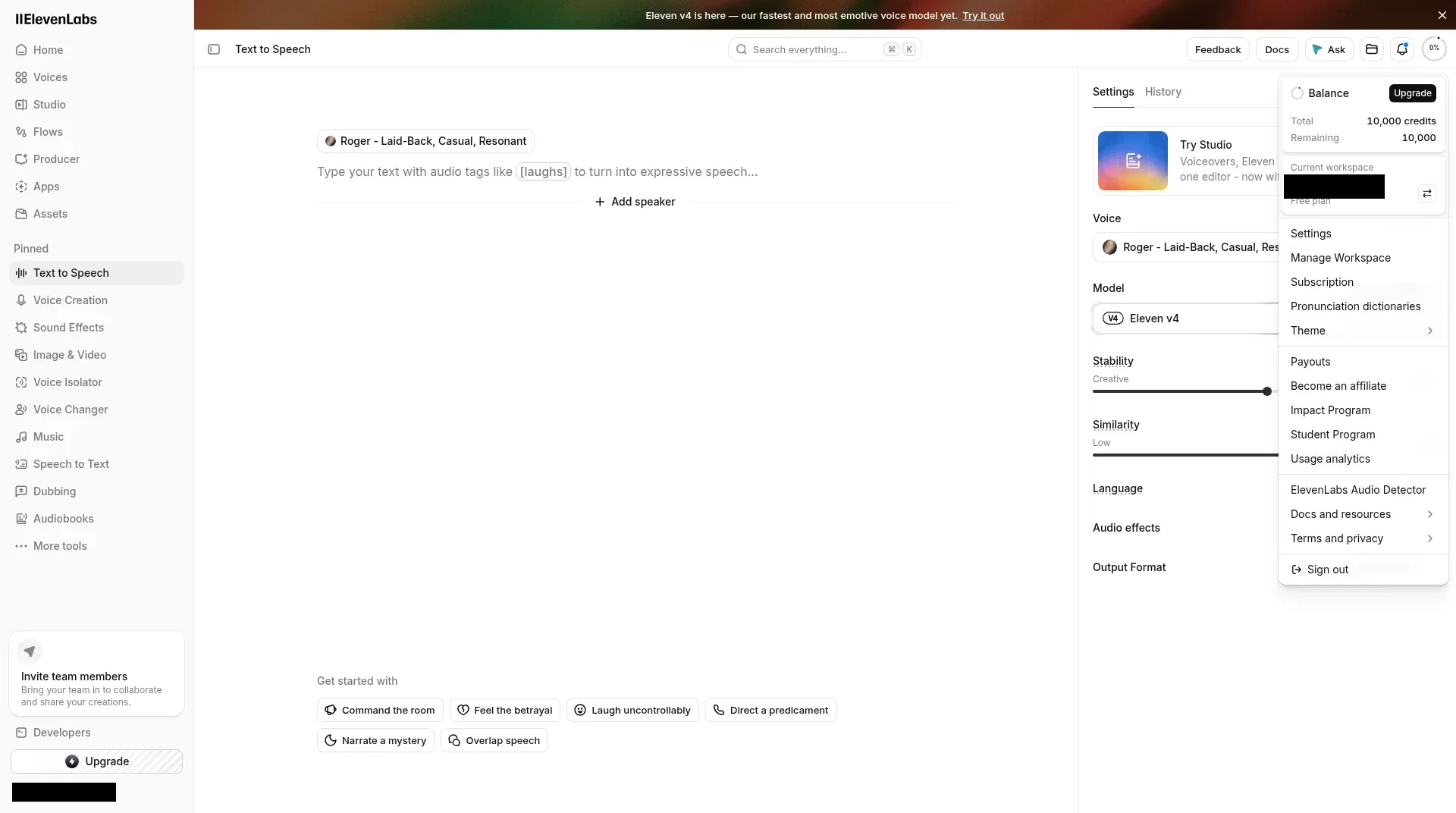
Voice cloning, Studio, dubbing, the API and any listening judgement were outside this test. We pasted our standard 130-word voice script into Text to Speech and kept every default: the voice “Roger” and the model “Eleven v4”. The editor counted 718 characters. We clicked generate once, checked the credit balance, downloaded the file and opened the format menu.
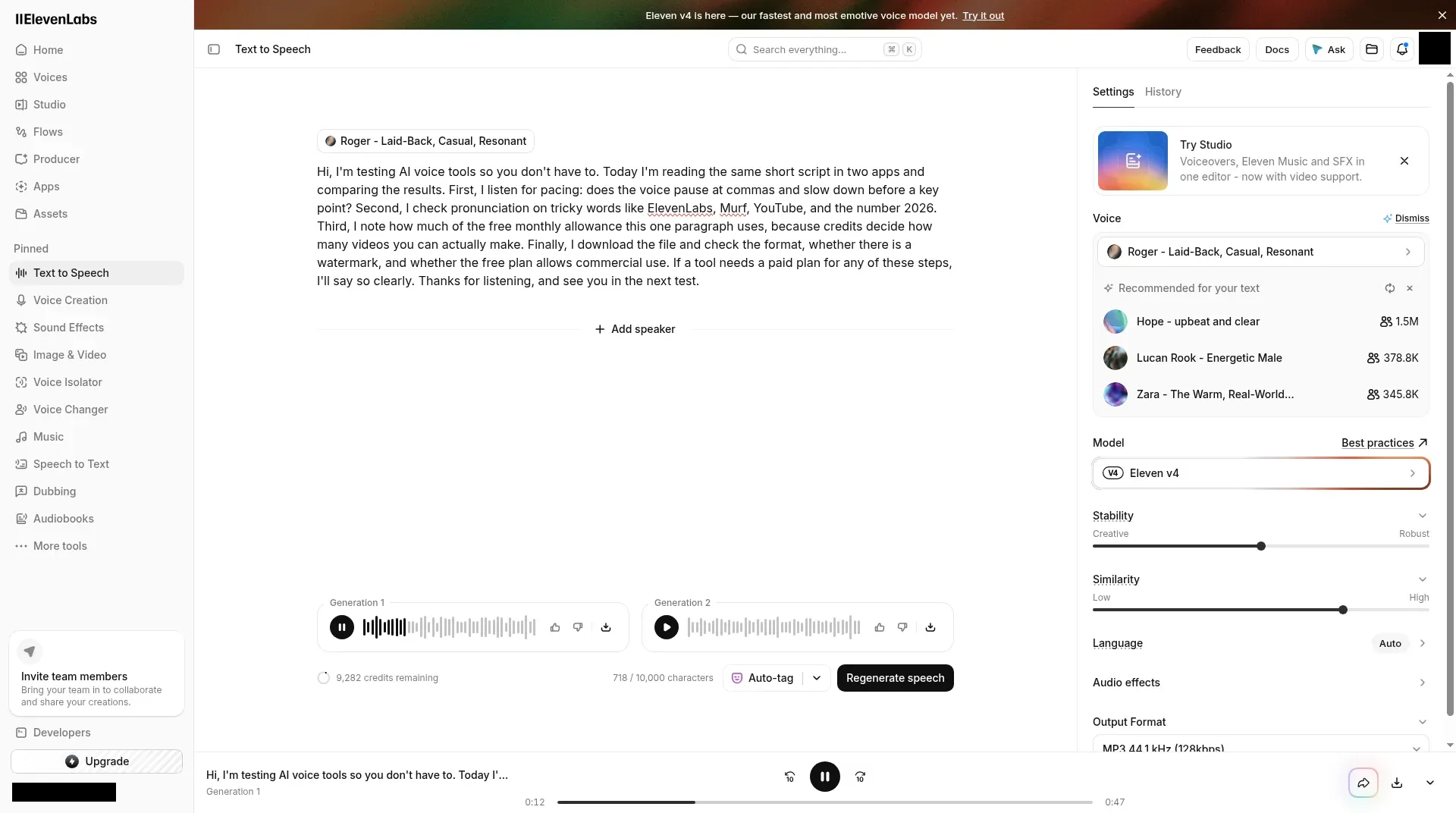
Credits: 718 characters cost 718 credits
In our test, the balance went from 10,000 to 9,282 credits, so the script used 718 credits, the same as its character count. That one click produced two versions, labelled “Generation 1” and “Generation 2”, and the 718 credits covered both, though the screen didn’t say whether two versions is the default. Playback was ready about 7 seconds after we clicked generate.
Downloads: MP3 128kbps only
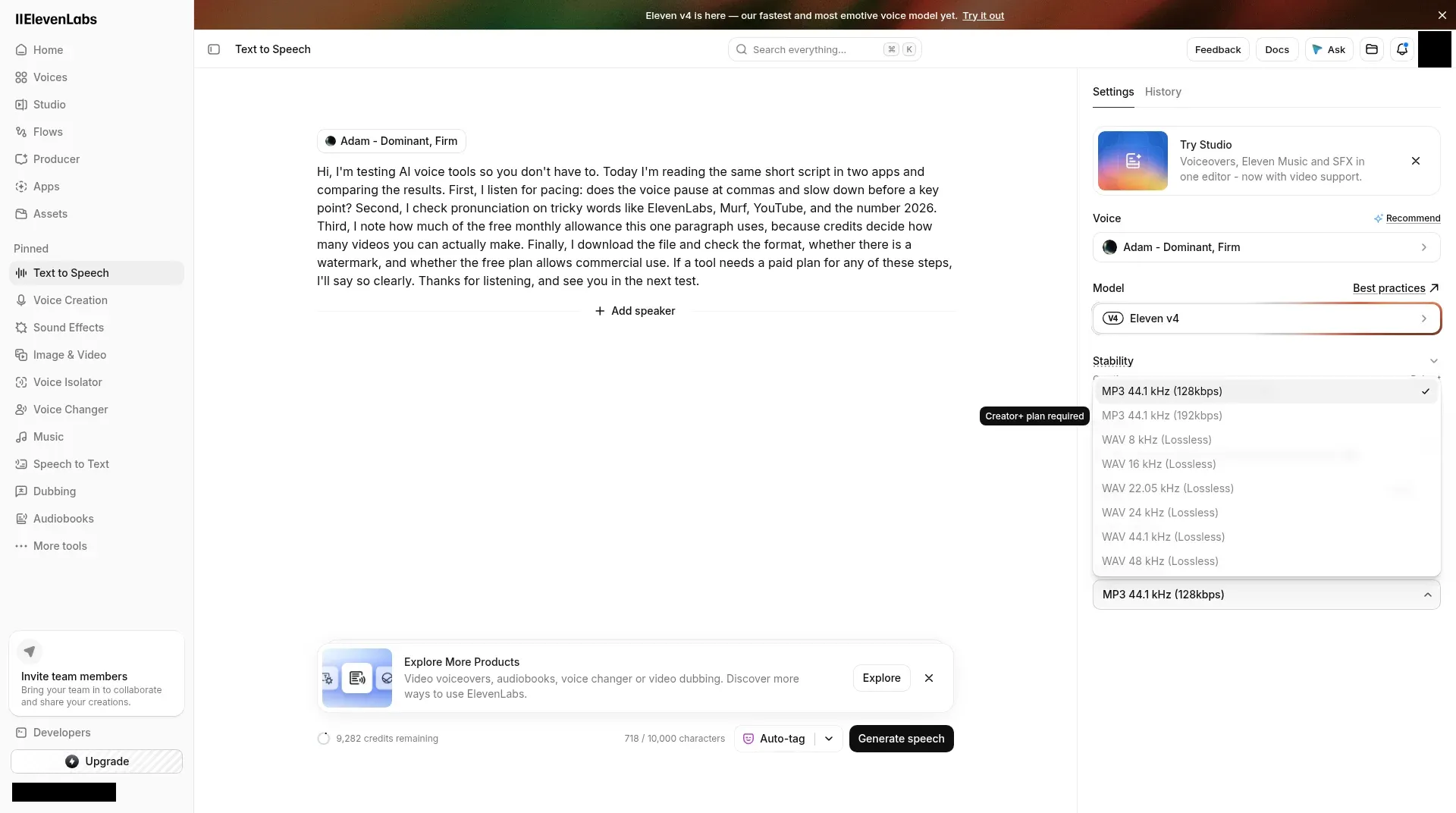
We downloaded Generation 1. The file was an MP3 at 44.1 kHz, mono, 47.1 seconds long.
The Output Format menu showed eight options, and only “MP3 44.1 kHz (128kbps)” was selectable. MP3 192kbps and six WAV options (8 kHz to 48 kHz) were greyed out. Hovering over the 192kbps option, the one option we checked, showed “Creator+ plan required”.
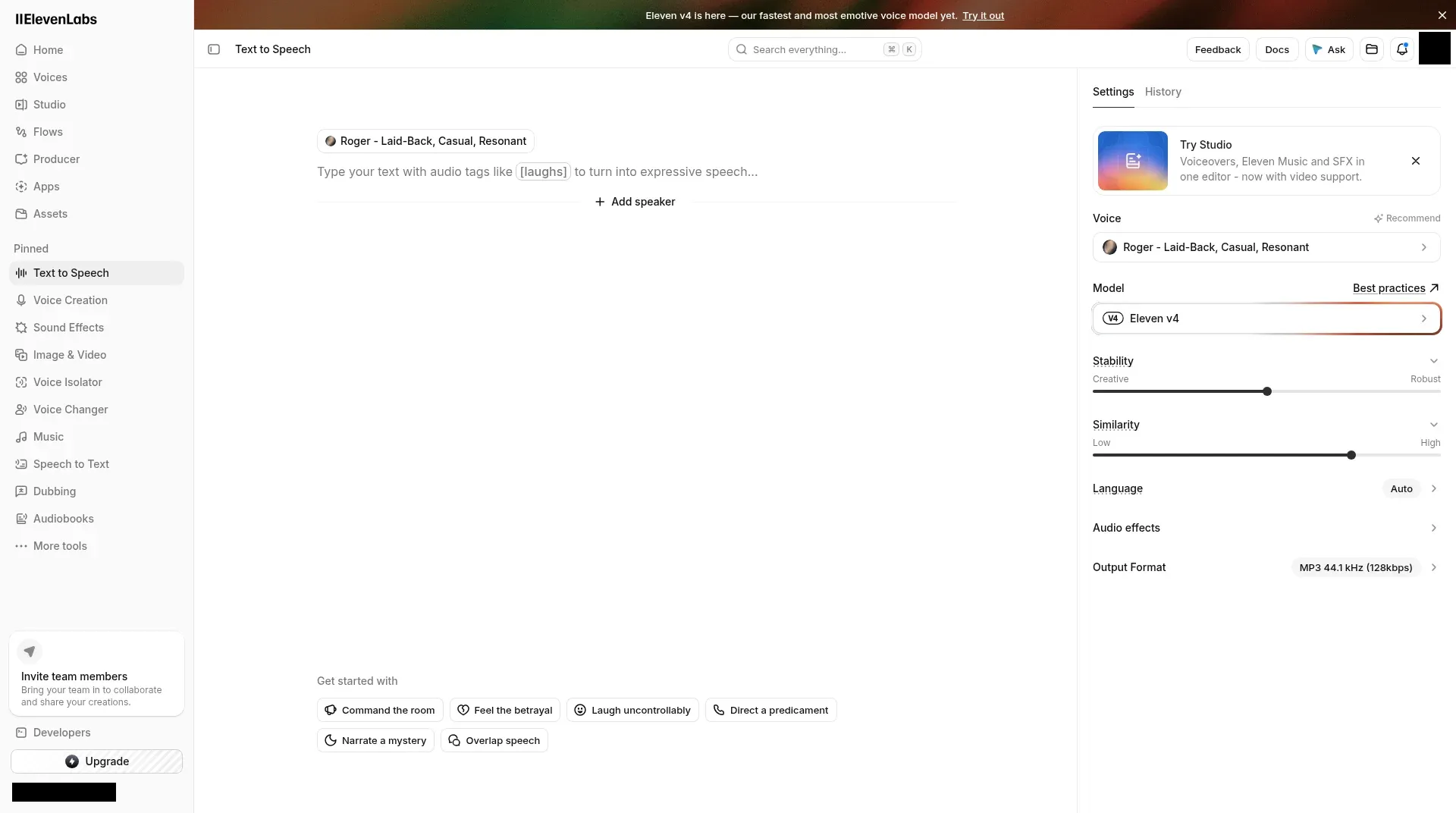
Settings you can change on Free
The settings panel listed Voice, Model, Stability (Creative to Robust), Similarity (Low to High), Language (Auto), Audio effects and Output Format. Without a total count on screen, we can’t say how many voices Free includes: the picker loaded 30 library voices plus 8 featured voices.
Commercial use and watermarks
The app showed no license terms during our test. ElevenLabs’ official pricing page lists the Commercial License from Starter up, not on Free (Last checked: 2026-11).
Our file wasn’t checked for a watermark. Per the official pricing page, a watermark comes up in connection with automatic dubbing; for Free text to speech it is Not listed (Last checked: 2026-11).
Pricing plans
Free
$0
- 10,000 credits a month
- Text to speech, speech to text, sound effects, voice design and music
- 3 Studio projects
Starter
$6/mo
or $5/mo billed yearly
- 30,000 credits a month
- Commercial license
- Instant Voice Cloning and Dubbing Studio
Creator
$22/mo
or $18.33/mo billed yearly
- 121,000 credits a month
- Professional Voice Cloning
- 192 kbps MP3 in text to speech
Pro
$99/mo
or $82.50/mo billed yearly
- 600,000 credits a month
- 44.1 kHz PCM output via API
- 192 kbps MP3 exports from Studio
The plan table also lists two team plans (Last checked: 2026-11). Scale is $299/mo, or $249.17/mo billed yearly, with 1.8 million credits and 3 workspace seats. Business is $990/mo, or $825/mo billed yearly, with 6 million credits and 10 seats. Enterprise is custom. Starter and Creator sometimes show a discounted first month, so plan around the regular price.
What the credits buy on other products
All products draw from the same monthly credit pool. ElevenLabs lists these approximate costs (Last checked: 2026-11):
- Text to speech: about 1 credit per character, with discounted rates for some Flash/Turbo models through the API (it matched exactly in our test).
- Speech to text: 330 credits per minute.
- Sound effects: 200 credits per generation.
- Music: 900 credits per minute.
- Voice changer and voice isolator: 1,000 credits per minute.
- Dubbing: 2,000 to 10,000 credits per minute, depending on the mode and whether the output is watermarked.
What else Free includes, and what it doesn’t carry over
Our test covered text to speech alone. Beyond it, the plan table lists speech to text, sound effects, voice design, music, image tools and 3 Studio projects on Free (Last checked: 2026-11).
Free credits don’t roll over. If you use 718 credits in a month, the rest of that month’s allowance doesn’t carry into the next one. On paid plans, unused credits roll over for up to two months, and downgrading or canceling forfeits them at the end of the cycle.
When to upgrade from Free
From ElevenLabs’ plan table (Last checked: 2026-11):
| You need… | Plan |
|---|---|
| Drafts and test voiceovers only | Free |
| To publish commercially | Starter ($6/mo, or $5/mo billed yearly) |
| MP3 192kbps | Creator or higher (“Creator+ plan required” in our test) |
| A Professional Voice Clone | Creator ($22/mo, or $18.33/mo billed yearly) |
| 44.1 kHz PCM output through the API | Pro ($99/mo, or $82.50/mo billed yearly) |
Check your own usage first. If one script uses as many credits as it has characters, you can work out from a month of drafts how many credits you actually need.
Who should skip ElevenLabs Free
- You plan to publish for money. Check Commercial use and watermarks first.
- You need WAV files. In our test, every WAV option was locked on Free.
- You need a talking avatar, not just a voice. See the avatar tools in our best AI video generators for short-form content.
Pros and cons
ElevenLabs
Our pickPrice: Free; Starter $6/mo; Creator $22/mo; Pro $99/mo; Scale $299/mo; Business $990/mo (yearly prices above) · Last checked: 2026-11
Pros
- In our test, credits used matched the character count: 718 characters cost 718 credits.
- Free lets you download the result as an MP3 file.
- One credit pool covers text to speech, speech to text, sound effects and music.
Cons
- One download format on Free in our test: the other seven options in the menu were locked.
- Free credits don't roll over to the next month, per the pricing page.
- Each product has its own credit rate, so mixing speech, music and dubbing takes some math.
- Best for
- Anyone who wants to draft short voiceovers for free and download them as MP3.
- Skip it if
- Anyone who needs WAV or higher-bitrate files without paying.
Bottom line
Start on Free if you want to draft voiceovers and keep the file: in our test each character cost one credit, and the free MP3 downloaded without a paid plan. When you’re ready to upgrade, Starter is the step the short answer explains.
Alternatives
Plans sold in hours of narration. Its Free plan let us generate audio but not download it; see our side-by-side test.
Better if you edit recorded video and audio by transcript and only need AI voice occasionally.
Better if you want a talking avatar video, not just a voice track.
Want to see the same script on Murf’s Free plan? Read ElevenLabs vs Murf AI. Writing the scripts with AI? Our AI writing tools for bloggers guide and ChatGPT vs Claude vs Gemini cover the drafting side. Our method is on How We Test.