AIPickr
Short answer: If you want a free plan that lets you keep the file, start with ElevenLabs: in our test its Free plan let us download an MP3 at 128kbps. Murf’s Free plan generated 51.0 seconds of audio from the same script, but export was locked, so you can only preview it. Neither free plan allows commercial use (Murf Free says “No Commercial Rights”; ElevenLabs licenses from Starter), and Starter at $6/mo is the cheaper way in, versus $29/mo for Murf Creator. Both points come from the official pricing pages (Last checked: 2026-11); that paid-plan pick is based on the official feature list, not a hands-on test.
Both tools got the same 130-word script, once each, on 2026-11-13. Voice quality was not evaluated.
How we tested
We kept the default settings in both tools. In ElevenLabs we generated once in Text to Speech. In Murf we created one project, pasted the script into one block and generated once. Then we checked each usage balance and tried to download the audio. Tested on the Free plan; paid plans may perform differently.
| Feature | ElevenLabs FreeRecommended | Murf Free |
|---|---|---|
| Free allowance | 10,000 credits/mo | 10 min of voice generation, 10 projects |
| Our test script used | 718 credits | 1 project; balance dropped by 1 second |
| Download on Free (our test) | MP3 44.1 kHz (128kbps) | |
| Commercial use on Free | ||
| Watermark on Free | Not listed | Not listed |
| Cheapest paid plan | Starter $6/mo ($5/mo yearly) | Creator $29/mo ($19/mo yearly) |
| Voice quality | Not evaluated | Not evaluated |
What one script used
ElevenLabs: the editor counted 718 characters, and the credit balance went from 10,000 to 9,282. One click produced two versions, and the 718 credits covered both. Our ElevenLabs Free plan review has the screenshots.
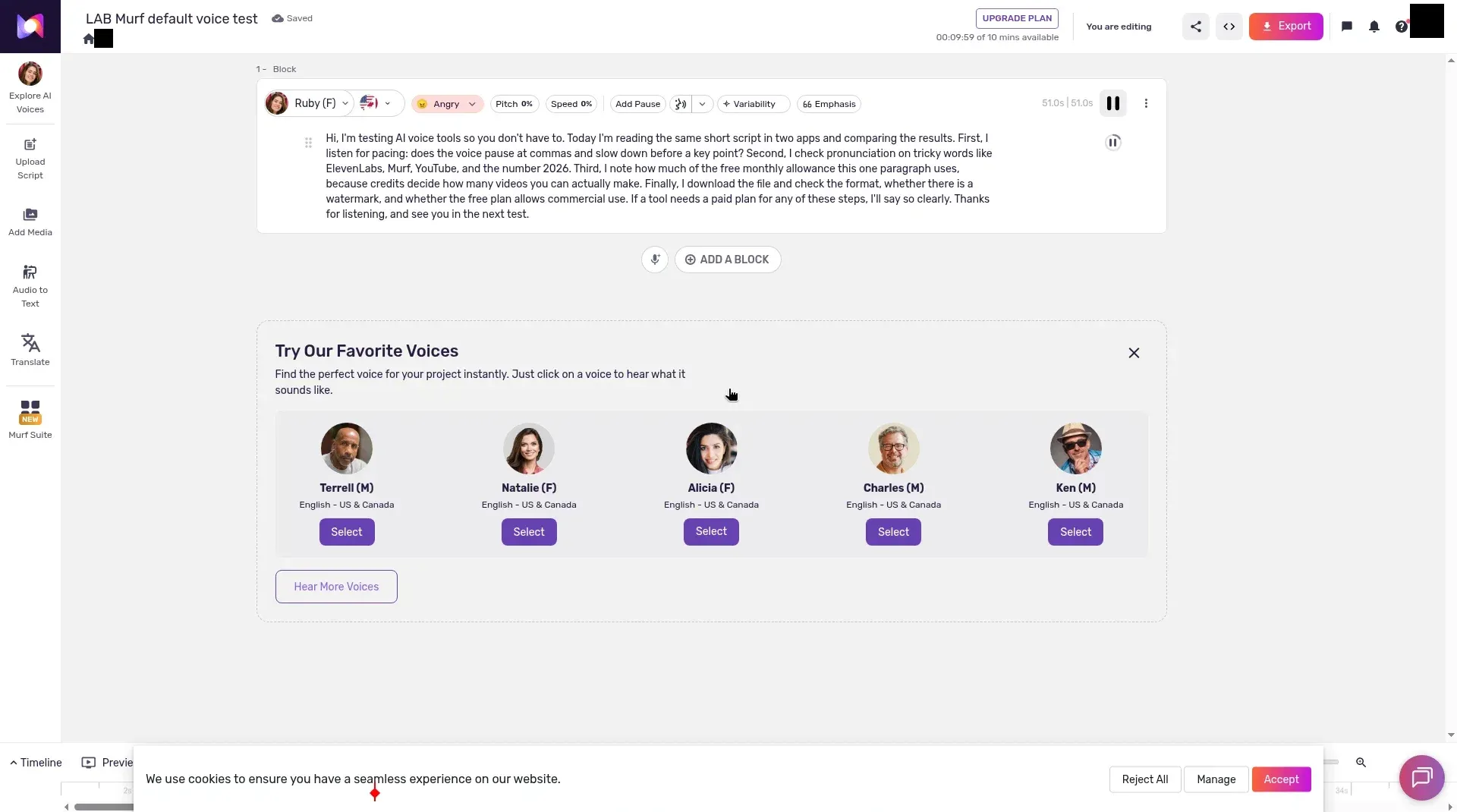
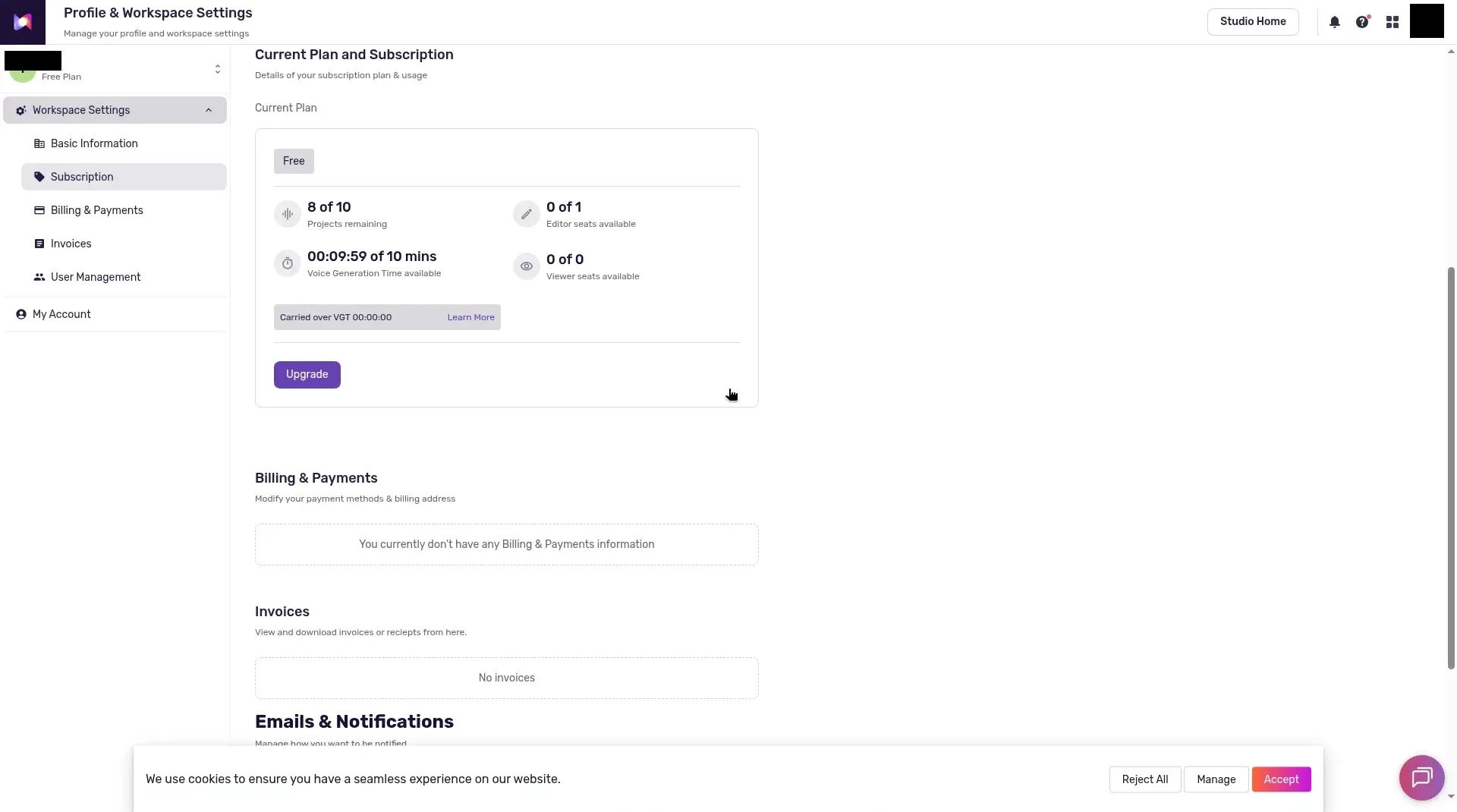
Murf: the block showed 51.0 seconds of audio. The Voice Generation Time balance went from 00:10:00 to 00:09:59 of 10 minutes, and projects remaining went from 9 to 8 of 10. The screens didn’t explain why only 1 second was deducted, so don’t plan on that ratio.
Downloads: the biggest free-plan difference
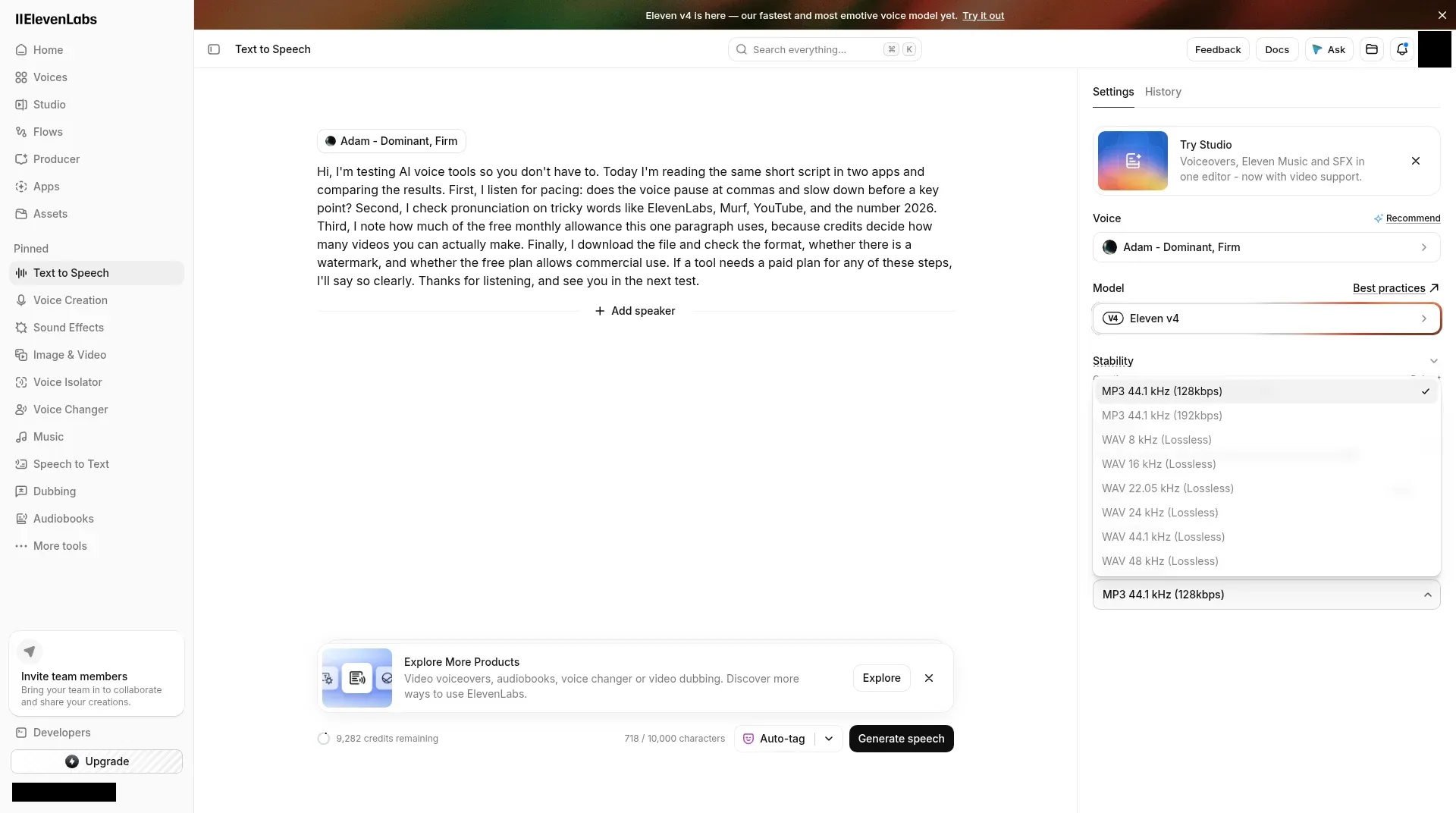
ElevenLabs let us download the first version as an MP3 (44.1 kHz, mono, 47.1 seconds). Only “MP3 44.1 kHz (128kbps)” was selectable; MP3 192kbps and six WAV options were greyed out.
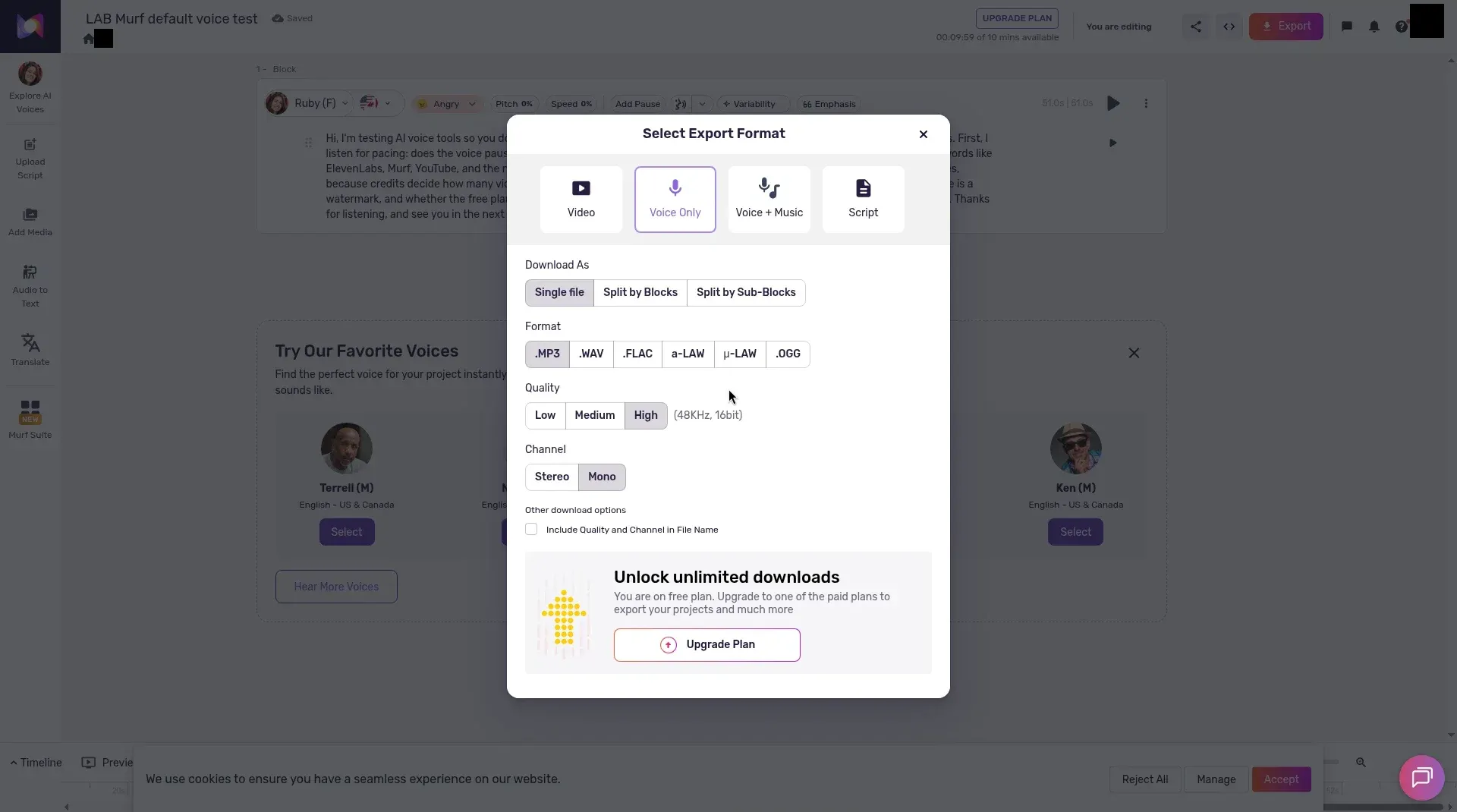
Murf opened a full export dialog with Video, Voice Only, Voice + Music and Script, and formats including MP3, WAV, FLAC, a-LAW, μ-LAW and OGG. But the dialog said: “You are on free plan. Upgrade to one of the paid plans to export your projects and much more.” No audio file could be downloaded.
Commercial use and watermarks
Neither app showed license terms during our tests. The official pricing pages are the only source here, and the short answer quotes what each one says (Last checked: 2026-11).
A watermark on free text to speech is Not listed on either pricing page (Last checked: 2026-11); our ElevenLabs review covers ElevenLabs’ note on dubbing watermarks.
Controls we saw on each free plan
ElevenLabs: Voice, Model, Stability, Similarity, Language, Audio effects and Output Format. The default voice was “Roger” on the “Eleven v4” model.
Murf: each block has a voice, a language flag, a style, Pitch, Speed, Add Pause, a pronunciation icon, Variability and Emphasis. The default voice was “Ruby (F)” with the style set to “Angry”, and the Pitch slider runs from -50% to +50%.
Pricing compared
Last checked: 2026-11 on each official pricing page.
| Plan | ElevenLabs | Murf AI |
|---|---|---|
| Free | $0, 10,000 credits a month | $0, 10 minutes, 10 projects, no downloads |
| Entry | Starter $6/mo ($5/mo yearly) | Creator $29/mo ($19/mo yearly) |
| Mid | Creator $22/mo ($18.33/mo yearly) | Business $99/mo ($66/mo yearly) |
| High | Pro $99/mo ($82.50/mo yearly); Scale $299/mo ($249.17/mo yearly); Business $990/mo ($825/mo yearly) | Enterprise, custom |
Murf sells time, not credits: on monthly billing, Creator includes 2 hours of voice generation a month and Business 8 hours; on yearly billing, 24 and 96 hours a year. ElevenLabs says yearly billing costs ten times the monthly price.
Which free plan to start on
| You want to… | Start with |
|---|---|
| Keep an MP3 of a draft voiceover for free | ElevenLabs Free |
| Hear a script in Murf’s studio before paying | Murf Free |
| Publish commercially | A paid plan on either tool (ElevenLabs Starter is the cheapest listed) |
| Get WAV files | A paid plan; WAV was locked on ElevenLabs Free and all export was locked on Murf Free |
Before you pay
1. Do you need the file, or just a preview? If you need the file, Murf Free won’t do it. ElevenLabs Free lets you download an MP3.
2. Do you think in credits or in hours? ElevenLabs counts credits (718 for our script); Murf’s paid plans list hours of voice generation.
3. Do you need your own voice? Murf lists custom voice clones as an Enterprise add-on. ElevenLabs lists Instant Voice Cloning from Starter.
How these fit into a video workflow
A voice tool is usually one step in a bigger pipeline. If you turn long recordings into Shorts, see our best AI video generators for short-form content. For the scripts themselves, start with AI writing tools for bloggers. How We Test explains our method.
1. ElevenLabs
Our pickPrice: Free; Starter $6/mo; Creator $22/mo; Pro $99/mo; Scale $299/mo; Business $990/mo (yearly prices above) · Last checked: 2026-11
Pros
- In our test, the Free plan let us download the result as an MP3.
- Credits used matched the character count in our test (718 for 718).
- Commercial License from the $6 Starter plan, per the official pricing page.
Cons
- WAV and the 192kbps MP3 were greyed out on Free in our test.
- Professional Voice Cloning starts at Creator ($22/mo), per the pricing page.
- Best for
- Anyone who wants to try AI voiceovers for free and keep the file.
- Skip it if
- Anyone who needs WAV files without paying.
2. Murf AI
Price: Free; Creator $29/mo; Business $99/mo; Enterprise custom (yearly prices above) · Last checked: 2026-11
Pros
- In our test, the Free plan generated 51.0 seconds of audio from our script.
- The editor shows per-block controls such as Pitch, Speed, Add Pause, Variability and Emphasis.
- Paid plans list voice generation in hours: 2 hours a month on Creator and 8 on Business.
Cons
- Export is locked on Free: no audio file could be downloaded in our test.
- Paid plans start at $29/mo, the higher entry price of the two.
- Custom voice clones are an Enterprise add-on.
- Best for
- People who want to preview a script in Murf's studio before deciding to pay.
- Skip it if
- Anyone who needs to download audio on a free plan.
Final verdict
Start with ElevenLabs Free if you want to keep a file: it was the only one of the two that let us download audio. Try Murf Free only to preview a script in its studio. For commercial work, go with ElevenLabs Starter, the feature-list pick from the short answer.